























Electronic Logbook for Company Vehicles
Request a Demo
Key Features of Our Electronic Logbook
Our solution is designed for companies that want complete visibility and control over their vehicles. The system is both intuitive and advanced – built to handle everything from a single service car to large fleets.
Automatic Travel & Compliance
- Automatic Travel Registration – Seamlessly logs every trip without manual input.
- Accurate Tax Data – Always compliant with Tax Administration requirements.
User-Friendly Reports
- Status Report – Key figures for each vehicle in your fleet.
- Travel Report – Trips by fleet, department, or employee.
- Company Car Report – Overview of private and business trips.
- Mileage Report – Odometer readings, distances, trip counts, and duration.
- Private Use Tracking – Mileage and time spent on private trips.
- Tax for Private Use – Calculates taxable trips, tolls, and costs.
- Driving Log Status – Overview of submitted trip reports per driver.
Smart Alerts & Notifications
- Driverless Travel Detection – Alerts when a vehicle moves without an assigned driver.
- Distance Deviation Alert – Notifies of 10%+ mismatches between actual and logged trips.
- Lost Contact – Triggered after 3 days without GPS signal.
- Power Loss Notification – Immediate alert if the tracking device loses power.
- No-Trip Reminders – Warnings for inactivity after 7 or 14 days.
System Integrations
- OBD Connector Integration – Connects directly to the car’s OBD port.
- Payroll & Expense Integration – Syncs accounting journals with internal systems.
- Rental Partner Integration – Links vehicle data with rental management partners.
Additional Fleet Features
- Data Export – Export all driving and fleet data with one click.
- Real-Time Tracking – Live GPS tracking of vehicles, assets, and equipment.
- Trip Confirmation – Approve or verify submitted travel logs.
- Google Maps Integration – View all routes on an interactive map.
- Equipment Tracking – Locate small tools, trailers, and large machinery.
- Theft Tracking – Detects and recovers stolen assets quickly.
- Project Cost Linking – Connect mileage and expenses directly to projects.
- Driving Limit Calculation – Automatic driving limit control and reports.
The electronic logbook is not just a logging system – it’s a complete tool for managing and analyzing vehicle usage within your company.
Why Choose Our Electronic Logbook?
Because the solution is designed for businesses – taking into account employer obligations, tax rules, and the efficient use of time and resources.
Ease of use
The app is simple to install and requires no technical knowledge.
Automation
All trips, mileage, fuel, and private use are recorded automatically.
Accurate data
All reports comply with tax regulations, ensuring correct documentation.
Complete overview
Administrators can instantly see the status of vehicles, drivers, and projects.
Cost control
By analyzing mileage, time, and fuel, companies can significantly reduce costs.
An electronic logbook doesn’t just save time – it gives you peace of mind that all driving activities are properly documented.
Electronic Logbook Services
Our platform offers several integrated services that make vehicle management easier, faster, and more precise.
GPS Tracking of Vehicles
Real-time GPS tracking gives employers full visibility into all company vehicles and cars in the fleet. You can easily see where each vehicle is, which routes are being driven, and which tasks are assigned. This enables better fleet management, safer operations, and less unnecessary driving.
Route Planning and Optimization
With route planning and optimization, businesses can save both time and fuel. The system suggests the most efficient routes for each work trip and reduces unnecessary travel. This leads to lower costs, reduced emissions, and higher employee productivity.
Fleet Management and Vehicle Administration
A modern fleet management program gathers all vehicle data in one place – maintenance, mileage, insurance, and service schedules. Vehicle administration becomes simple when everything is digital and updated automatically. Administrators can plan maintenance, monitor usage, and ensure that all driving logs are complete.
Tool and Equipment Tracking
The system can also track machines, tools, and other equipment using GPS tags. This provides full visibility over all assets at construction sites or in service vehicles and reduces losses and misuse. Equipment control and machinery tracking ensure that everything is where it should be.
Security and Theft Protection
Safety for vehicles and employees is a top priority. Vehicles can be equipped with GPS alarms and theft protection that send alerts in case of unauthorized movement or power loss. The system enables quick response in the event of theft and provides a safer working environment for drivers.
Administration and Reports
All data is automatically collected into reports for tax, accounting, and internal control purposes. Driving lists, mileage analyses, data exports, and detailed reports make work easier for the finance department. The company gains full control over vehicle usage, costs, and private driving.
Explore the Cars & Maps modules
Cars & Maps is built from focused modules that work together. Dive into each one to see exactly how it fits into your workflow.
Fleet Driver Management
An electronic driver's logbook with automatic GPS trip tracking, vehicle usage reporting, and simplified tax-compliant mileage records.
Learn moreReal-Time Workforce
Real-time tracking of employees and vehicles gives businesses full control over field operations, projects, and logistics.
Learn moreMap-Based Task Allocation
More than a map with dots or simple GPS tracking - a real operational control tool for allocating and following up tasks.
Learn moreSubcontractor Coordination
Centralized management of subcontractors, employees, and projects, coordinating tasks in real time and reducing the risk of errors.
Learn moreSafety & Employee Support
A direct line to help for field employees, with real-time visibility into people, vehicles, and tasks for managers.
Learn moreEquipment Tracking
Track tools, trailers, containers, and machinery in real time, connected to employees, projects, and workflows.
Learn moreHow to Get Started
Register vehicles and employees
Create an account and add vehicles with license plate, type, and status.
Install the app
Drivers log in on their phones – trips are recorded automatically.
Activate GPS and integrations
Connect to payroll, accounting, and project systems for full automation.
Start driving
The system handles everything – from logging to reporting.
Within a few days, you’ll see results: less paperwork, better control, and faster reporting.
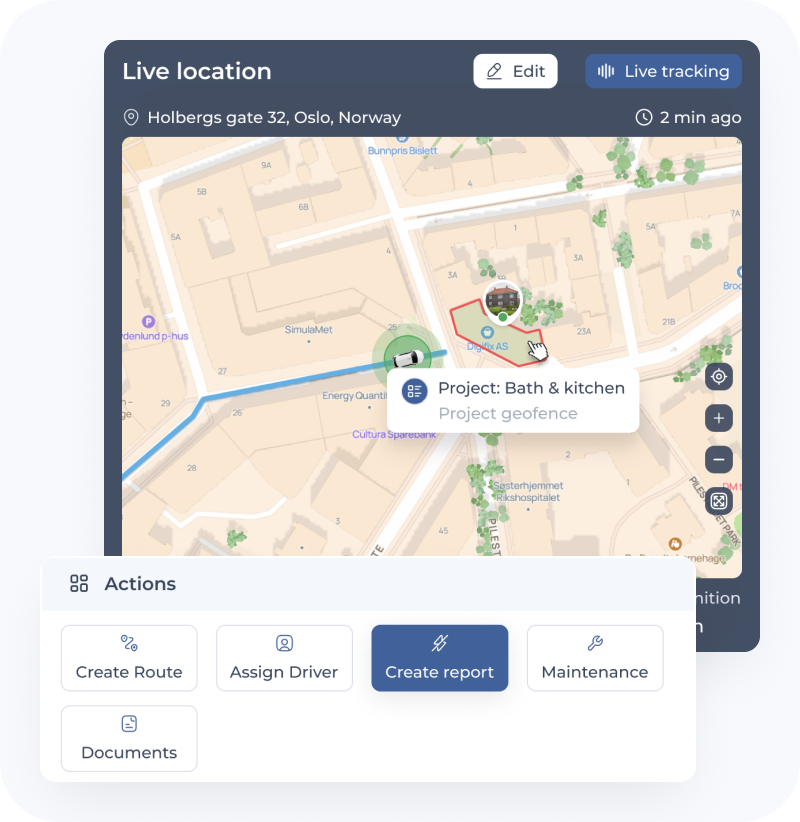
User-Friendly Apps for Your Employees
The user-friendly app makes daily operations easier for everyone in the company. Everything is designed to save time and simplify processes. Accurate data is collected automatically and can be used directly in reports.
For administrators
Full overview of vehicles, equipment, and projects on the map. Approve trip logs and plan resources.
For drivers
The app records each trip automatically and separates private from business driving. Drivers can view their statistics, notifications, and submitted logs.
For project managers
Track crews, see who is closest to a task, and coordinate assignments in real time.
Request a Demo
Experience how an electronic logbook can transform your fleet management. Try the system for one month for free. You’ll get access to all features – automatic logging, GPS tracking, reporting, and integrations – to see real results in action. A smart, user-friendly, and reliable electronic logbook gives your company full visibility, better control, and lower costs. Choose a digital solution that makes everyday work easier – for employers, drivers, and the finance department.
Frequently
Asked
Questions
Homeowners post tenders describing the work they need done, and you receive matching requests based on your trade and service area. You can review the details, submit a competitive offer, and get in touch directly with the homeowner — no cold leads, just real projects that fit what you do.
Jelpify runs on a subscription model with pricing based on your company size and the tools you need. There's no cost to browse available tenders — you only commit once you decide to submit an offer on a project.
Once a job is agreed and signed digitally, you can send invoices and track payments directly through the platform. This keeps your project economy organized in one place, without chasing paperwork or manual reconciliation.
Every professional signs in using trusted identification methods such as BankID, and is connected to an officially registered company. This keeps the platform accountable and gives homeowners confidence in who they're hiring.
Yes. Your dashboard lets you track schedules, assign subcontractors, manage documentation, and monitor several active projects at once, so nothing falls through the cracks as your workload grows.
Reviews
Cooperation with this platform was the best decision for our company. Thanks to it, we have received a constant stream of clients looking for our services. We appreciate transparency and professionalism in everything.
12.06.2026
David Garcia
CEO CompanyThis site has greatly simplified our search for customers. The reviews and ratings on the platform have raised our reputation to a new level. Highly recommended for anyone looking for a partnership in the repair and construction industry.
12.06.2026
Max Conversion
CEO CompanyThe platform's features are unparalleled. It has significantly reduced the time we spend managing our projects, allowing us to focus on growth and delivering high-quality work to our clients.
10.06.2026